

CompTIA Linux+ V8
Course Overview
CompTIA Linux+ (V8) validates your ability to manage, secure, automate, and troubleshoot Linux systems in cloud and hybrid environments. You will gain hands-on experience with automation, orchestration, security, and containers to prepare for roles like Linux systems administrator, systems engineer, and network engineer. Linux+ demonstrates your ability to support and protect the critical Linux platforms that businesses rely on.
Skills Learned
- Configure and manage Linux systems, storage, networks, and services in cloud and hybrid environments.
- Apply best practices, including permissions, authentication, firewalls, and system hardening.
- Automate administration tasks and streamline operations with shell scripting, Python, and configuration management tools.
- Deploy, maintain, and monitor containers and virtual machines using leading technologies.
- Troubleshoot system, network, security, and application issues to ensure uptime and reliability for business operations.
Exam Details
- Exam version: V8
- Exam series code: XK0-006
- Launch date: July 15, 2025
- Number of questions: Maximum of 90 (multiple-choice and performance-based)
- Duration: 90 minutes
- Passing score: 720 (on a scale of 100–900)
- Languages: English
- Recommended experience: 12 months of hands-on experience with Linux servers; CompTIA A+, Network+, or Server+, or comparable knowledge is recommended.
- Accreditation and benefits: ISO accredited by the ANSI National Accreditation Board
- Retirement: usually three years after launch (estimated 2028)
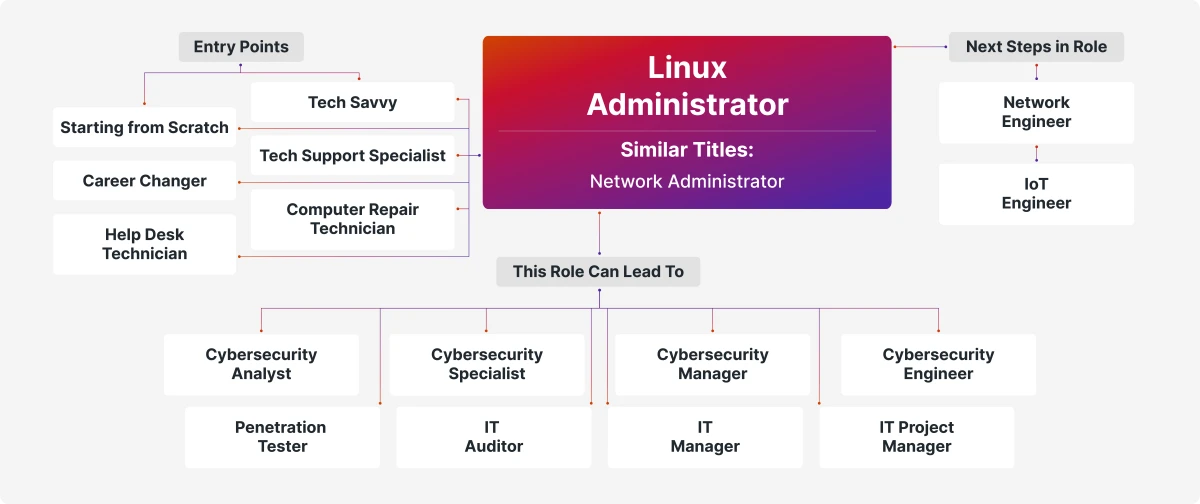
Career Path

Target Audience
- Help Desk Technician
- Linux System Administrators
- Network Administrators
- Network Engineer
- Cybersecurity Analyst/Engineer
- IT Manager
- Penetration Tester
Course Content
5 modules · 29 topics01System Management (23%)7 topics
- Linux basics: Identify boot process steps, kernel, filesystems, and architectures.
- Device management: Manage kernel modules, hardware components, and device utilities.
- Storage management: Configure LVM, RAID, partitions, and mounted storage.
- Network configuration: Set up hosts, DNS, interfaces, and network tools.
- Shell operations: Use navigation, editing, redirection, and environment variables.
- Backups and restores: Perform archiving, compression, and data recovery.
- Virtualization: Deploy hypervisors, create VMs, and manage disk images.
02Services and User Management (20%)6 topics
- Files & directories: Control permissions, create links, and manage special files.
- Account management: Add, remove, and modify users and groups.
- Process control: Monitor states, adjust priorities, and schedule jobs.
- Software management: Install, update, or remove packages and repositories.
- Systems management: Start, stop, and review services, logs, and timers.
- Containers: Operate container runtimes, manage images, and create networks.
03Security (18%)6 topics
- Auth & accounting: Configure PAM, LDAP, Kerberos, and enable auditing.
- Firewalls: Set firewalls using iptables, nftables, UFW, and zone rules.
- OS hardening: Apply permissions, configure sudo, and secure remote access.
- Account security: Enforce password policies, restrict shells, and enable MFA.
- Cryptography: Encrypt files, use hashing, and manage certificates.
- Compliance: Verify integrity, run scans, and maintain standards.
04Automation, Orchestration, and Scripting (17%)5 topics
- Automation: Automate tasks with Ansible, Puppet, and CI/CD tools.
- Shell scripting: Write and troubleshoot variables, functions, and logic flows.
- Python basics: Develop scripts using environments, packages, and data types.
- Version control: Manage code with Git workflows and tagging.
- AI best practices: Apply code generation and prompt engineering responsibly.
05Troubleshooting (22%)5 topics
- System monitoring: Monitor health, logs, and event alerts.
- Hardware/storage: Diagnose boot, mount, and repair issues.
- Networking: Resolve firewall, routing, DNS, and connectivity problems.
- Security: Fix SELinux, permission, and vulnerability issues.
- Performance: Analyze CPU, memory, I/O, and optimize response times.
Schedule Dates
4 upcoming batches| Batch Dates | Duration | Batch Options | Language | Action |
|---|---|---|---|---|
| 28 December 2026 - 01 January 2027 | 5 Days | 4 hours & 8 hours | English / Arabic | |
| 29 March 2027 - 02 April 2027 | 5 Days | 4 hours & 8 hours | English / Arabic | |
| 05 July 2027 - 09 July 2027 | 5 Days | 4 hours & 8 hours | English / Arabic | |
| 11 October 2027 - 15 October 2027 | 5 Days | 4 hours & 8 hours | English / Arabic |
Can’t find a suitable date? Request a schedule that fits your team.
Request More InformationFAQs
What is CompTIA Linux+ certification?
With CompTIA Linux+, you validate your ability to secure the enterprise, power the cloud, and manage Linux-based systems efficiently. The certification covers important skills in system administration, automation, troubleshooting, containers, and more, so you are prepared for today’s hybrid tech environments. The newest version is Linux+ V8 (XK0-006), while V7 (XK0-005) remains available until its retirement.
Is the CompTIA Linux+ certification good for beginners?
CompTIA Linux+ is open to anyone, and you do not need prior certifications to take the exam. However, it is best suited for those who already have basic IT knowledge and at least 12 months of hands-on experience with Linux servers. If you are new to IT, starting with CompTIA A+ or Network+ can give you a strong foundation for success with Linux+.
Is CompTIA Linux+ recognized internationally?
Yes, you can use CompTIA Linux+ to prove your Linux skills to employers worldwide. It’s respected by organizations across industries and countries and aligns with global IT standards.
Why does CompTIA update the Linux+ exam?
CompTIA updates the exam so you stay in step with evolving technologies, industry standards, and job roles. Updates ensure that your Linux+ credential reflects current demands, including security, automation, and containerization, and that you are prepared for modern IT environments.
How long is the CompTIA Linux+ certification valid?
Your Linux+ certification is valid for three years. You can renew it by earning 50 Continuing Education Units (CEUs) through activities like training, webinars, or work experience, or by obtaining additional CompTIA or other qualifying IT certifications.
What topics are covered in the CompTIA Linux+ exam?
Linux+ V8 and Linux+ V7 both cover Linux system management, security, scripting, containers, automation, troubleshooting, and operating system fundamentals. In V8, you’ll find a greater focus on automation, orchestration, Python scripting, CI/CD, Kubernetes, and updated security and cloud technologies. V7 emphasizes foundational administration and security with less coverage of current automation and orchestration tools.
Flexible Training Options to Meet Your Needs
Choose how you learn — live online, in-classroom, at your workplace, or internationally. CounselTrain delivers certified IT training across the UAE in the format that fits your team.
Select the method that best suits your needs.
Online Instructor-Led Training
Learn from the comfort of your workplace or at home through live virtual sessions led by expert trainers.
Learn moreHighlights
Classroom Training
Participate in interactive, face-to-face training in our top 5-star training facilities in Dubai.
Learn moreHighlights
Onsite Training
Learn a customised curriculum in your workplace to ensure the most impact and team participation.
Learn moreHighlights
Overseas Training
Participate in our international training sessions and improve your abilities with world-class instructors.
Learn moreHighlights
Related Courses
Other courses in the same category that might interest you.

T|IE: Threat Intelligence Essentials
View Course
I|SE: IoT Security Essentials
View Course